Manage Your Plans
You define the plans your organizations subscribe to. Names, prices, quotas, and feature toggles all live in your kuploy-cloud admin — kuploy.app doesn't push a catalog down to you.
This page covers the day-to-day: where to edit, what the Internal tier is for, and how to recover if you delete too much.
Where you edit them
Go to /admin/plans in your kuploy-cloud admin. Each plan card shows:
- Name + slug + price/cycle
- Quotas (projects, apps, databases, domains, team members, build minutes, storage, mailboxes)
- Feature toggles (AI assistant, payment gateway, mailboxes, domain purchase, self-service restore)
- Default / Active / Hidden / Platform-managed badges
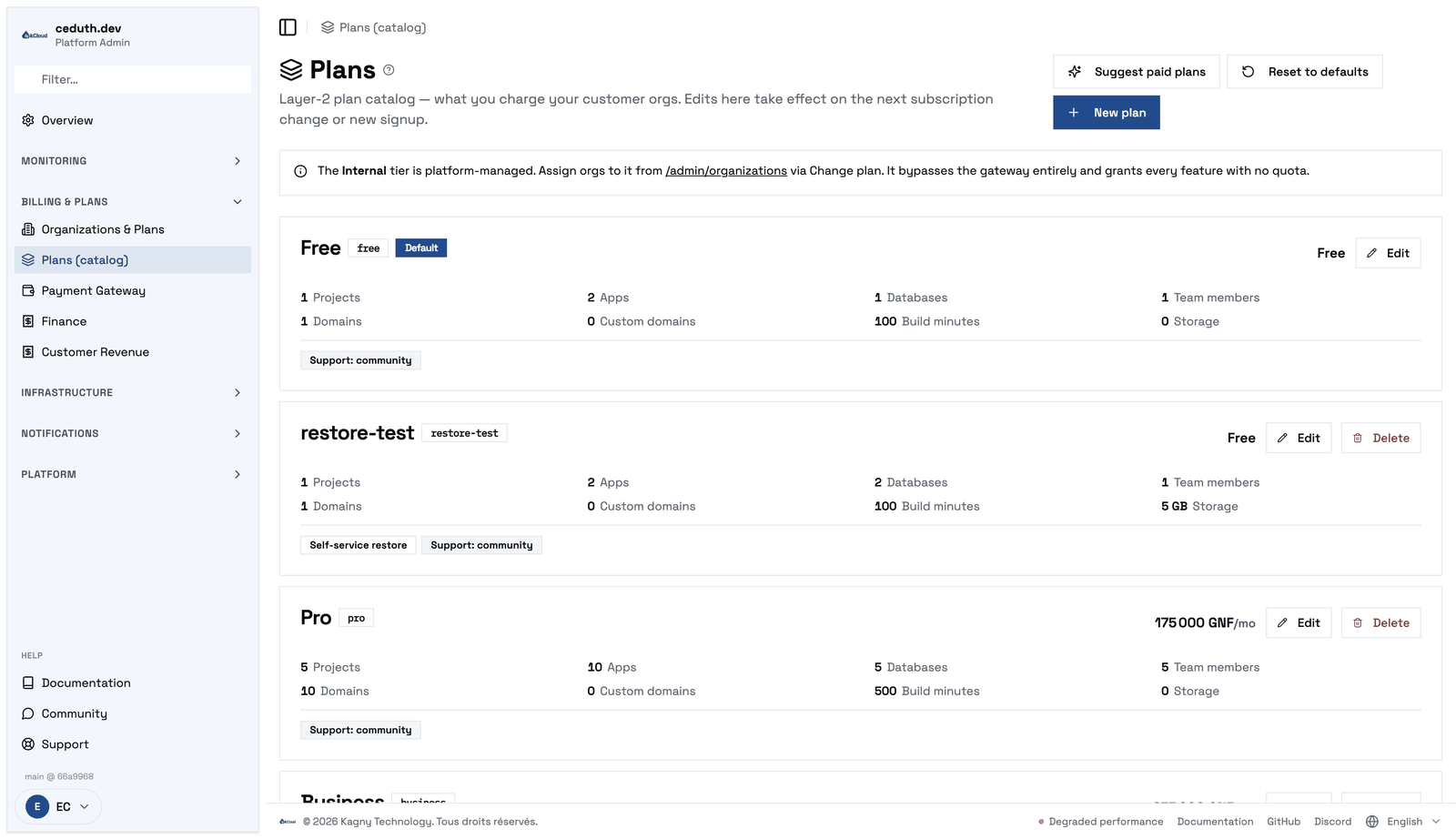
Edit opens the form for that plan. New plan at the top right opens the same form with empty defaults. Saving a paid plan auto-creates the matching Stripe Product and Price on your own Stripe account — you never have to paste Stripe IDs by hand.
Quotas
The form says it on the section itself: -1 = unlimited, 0 = none. Any positive number is the cap. Every quota field wants a number — you can't leave one blank and have it mean something.
0 is not "unlimited", and one field reads it looselyTyping 0 switches the thing off. The exception is Instances, where 0 is read as 1: an app has to run at least one replica, so zero isn't a state it could deploy in.
The blank-means-unlimited rule you may have seen belongs to Max chat sessions, which is a feature field rather than a quota. Don't carry it across.
A worked ladder
The question the form can't answer is what to put in it. This is the ladder on our own reference deployment — a starting point to scale to your hardware, not a recommendation:
| free | pro | business | |
|---|---|---|---|
| Buckets | 2 | 10 | 50 |
| Storage | 5 GiB | 100 GiB | 250 GiB |
| Mailboxes | — | 5 | 25 |
| Purchasable domains | 2 | 10 | 50 |
| AI assistant | in-cluster | paid, $5/mo | paid, $20/mo |
| AI chat sessions | 10 | 50 | 200 |
| Self-service restore | — | ✓ | ✓ |
| Payment gateway | — | ✓ | ✓ |
| Support | community | priority |
This is the part that survives whatever numbers you choose. Mailboxes on with
its limit at 0 advertises mail and grants none. The same pairing catches domain
purchase, buckets, storage and chat sessions — set both, or set neither.
A fresh install seeds only free and Internal, and that free row is a placeholder picked to keep the app running. Review it before you open signups.
The payment gateway is not Business-only. A paying org should meet the feature and hit its cap rather than never see it. The free tier is the one that doesn't get it, and the reason is risk rather than cost: an org taking real money brings disputes, chargebacks and KYC with it, and a free tier is where that arrives first.
AI chat sessions
This limit counts chats that are open now, not chats ever created. A chat stops counting an hour after its last message, on its own — there is nothing to close or delete, and the count falls back by itself.
The field takes 1 or more. To switch AI chat off for a tier, clear its AI assistant feature toggle rather than typing 0.
This cap covers the chat assistant only. Deploying by chat with the agent is not counted against it and has no per-organization ceiling, so an operator reading "AI assistant" should not expect this number to bound it.
Currency
A plan's billing currency must be one your Payment Gateway can actually settle. The currency field offers the currencies your gateway's enabled providers accept (e.g. GNF, XOF for mobile money). If you run Stripe, you can enter any valid ISO currency — Stripe accepts its full supported list and rejects anything it can't process at checkout.
- This only constrains paid plans (price > 0). A free / $0 plan has nothing to charge, so its currency is unrestricted and you can edit it before configuring a gateway.
- Why the currency is restricted at all is on Rails, countries & currencies.
- If you haven't set up the Payment Gateway yet, the currency field is disabled and paid plans can't be saved — configure it first at Admin → Payment Gateway. The rest of the plan form stays editable.
- Prices display in their own currency everywhere customers see them (the public
/pricingpage, the org billing page) — a 290,000 GNF plan shows as GNF 290,000, not a dollar amount.
Default plan
Exactly one plan is the default — newly-created organizations land there until you (or they) change it. The form auto-unsets the previous default when you mark a different plan as default.
Active vs Public
- Active off: hidden from new signups, but existing subscribers keep running.
- Public off: hidden from
/pricingand the org-facing upgrade picker. Customers can't self-subscribe, but you can still assign orgs to it from/admin/organizations. Useful for grandfathered legacy tiers.
Plan delete vs deactivate
You can't hard-delete a plan that has active subscriptions referencing it — the system refuses and asks you to deactivate instead. Deactivating keeps existing subs working but hides the plan from new signups. Once no subscription points at it, hard-delete is allowed.
You also can't deactivate the default plan — mark another plan as default first.
The Internal tier
There's a special plan called Internal seeded on first install. It bypasses billing entirely and grants every feature your platform tier on kuploy.app permits, with unlimited quotas. You use it for:
- Dogfood orgs you operate yourself
- Comp'd accounts (employees, partners, beta testers)
- Support recovery — temporarily lift caps on an org mid-incident without bumping them to a real paid tier
Assigning an org to Internal
Go to /admin/organizations, find the org, click Change plan, pick Internal from the dropdown. The org's subscription flips immediately — no payment gateway interaction, no Stripe charge. An "Internal" badge appears next to the org name in the list so it's obvious which orgs bypass billing.
Reverting from Internal
Same dialog — pick a normal plan. The next renewal goes through your gateway normally.
What you can't do
The Internal tier is platform-managed; the Edit and Delete buttons don't appear on it. Its slug (internal) is reserved — you can't create another plan with the same slug. This is intentional so support patches and operator-side scripts can rely on its shape.
The Training plan
A second seeded plan, Training, is for people learning kuploy on your cloud. It is free, hidden from /pricing, and small on purpose: one project, four apps, two databases, one custom domain, no mailboxes, and one member. A trainee cannot invite anyone, not even their trainer; the trainer looks in by impersonating them (see the mentor guide). A trainee gets a real organization and real deployments, just a short fence around them.
Training is part of your kuploy.app licence. Every plan sold there includes it, so you have it unless it was taken off your licence on purpose. Without it, nobody on your cloud gets Training: there is no Training item in any sidebar, and a lab check is refused. A cloud that has not synced its licence yet behaves the same. Your tenants are never told whose licence it was.
Per tenant, the switch is the plan. On the Training plan they get Training; on any other plan they do not.
Giving a trainee a sandbox
Go to /admin/organizations, find their organization, click Change plan and pick Training. That is all; nothing is charged.
Sandbox lifetime
The plan form has one field the others do not: Sandbox lifetime (days). Leave it blank and training organizations stay open until you change their plan. Give it a number, say 30, and each training organization closes that many days after it was put on the plan:
- the owner gets an email 7 days before, and another 1 day before;
- on the day, the organization is disabled: members are blocked from the dashboard and the API, while deployed sites keep serving and data stays. The badge reads Auto-disabled; the reason training_expired appears in the CSV export.
To give someone more time, find their organization in the list at /admin/organizations, open the row's ⋮ menu and click Reset period. The item is there only for subscriptions you assigned by hand, which a training one always is. The clock starts again from today and the two emails are sent again when due.
If you re-enable a closed training organization by hand, it stays open. The automatic closing does not touch it again, even if the lifetime passes.
The seeded quotas are a starting point. Edit the plan like any other if your courses need more.
"Reset to seeded defaults"
If you delete too many plans or want to start fresh, click Reset to seeded defaults at the top of /admin/plans. It re-inserts the bundled defaults (free, training + internal) using ON CONFLICT DO NOTHING semantics:
- Plans that already exist with those slugs are not touched.
- Plans you've added with different slugs are not touched.
So Reset is safe even on a heavily-customized catalog — it only fills in missing seeded rows. If you actually edited the free row and want the bundled values back, deactivate-and-recreate that one row by hand.
"Suggest paid plans"
A fresh install seeds only free, training + internal — no paid tiers. Rather than hand-build each one, click Suggest paid plans at the top of /admin/plans to seed a Starter / Growth / Business ladder to start from. The suggested plans:
- are created as hidden drafts (Public off) at price 0, in your gateway's currency — review the quotas, set a real price, then turn Public on to publish each one;
- have quotas clamped to your platform plan's caps, so every suggestion is valid against your kuploy.app tier out of the box;
- are idempotent — running it again skips any of those slugs you already have, and never touches your other plans or the default.
The button is available once your Payment Gateway is configured (that's where the currency comes from). It's a starting point, not a recommendation — tune everything to your market.
What kuploy.app charges you
Your platform plan is a separate layer, managed on kuploy.app — see Plans & the two layers. It caps what you can offer your orgs on two axes:
- Quotas — if your Growth tier permits 20 projects in aggregate, you can't offer your customers a plan with "unlimited projects" each. The form refuses limits that exceed your platform cap and points you at the upgrade.
- Features — boolean capabilities (payment gateway, mailboxes, AI assistant, domain purchase, self-service restore) only flip on for an org if BOTH your platform tier AND the org's plan grant it. An org assigned to Internal still respects this ceiling: Internal grants everything, but only up to what your platform tier allows.
- White label and landing page templates are not here — they apply to your whole platform rather than to one organization, so they live on Admin → Theme and are answered by your kuploy.app tier alone. There is nothing to set per plan.
See Cloud Billing Setup for connecting Stripe to your kuploy-cloud instance, and Licensing for the platform-plan side.