AI — operator setup
Everything your customers see — the /ai panel, the Org Agent, MCP tokens, AI
Model Access for their apps, and what any of it costs them — is documented in
the developer guide's AI pages. This page is the
half they can't do: backend keys, tiers, prices and who pays for the models.
Where the operator controls live
Operator-side configuration — backend API keys, tier policy on plans, per-organization spend visibility, and gateway/model health — lives in the admin dashboard under Admin → AI, alongside the status page components AI Gateway and AI Models. What each plan gets — whether the AI assistant is on at all, its tier, its monthly spend cap, how many concurrent sessions it allows, and which providers it may call — is set per plan in the plan editor at Admin → Plans.
Limiting a paid plan to specific providers. With AI tier = paid, the plan editor shows one checkbox per paid provider under Paid providers this plan may call. Leave all unchecked for "every provider you have enabled"; check some to scope that plan's keys to those providers only (for example a Groq-only plan next to a Claude plan). A provider that is not yet enabled and keyed under Admin → AI is greyed out — a plan can only offer what the platform has configured, so enable the provider first, then come back and check it. Existing keys on the plan pick up the change within one reconcile tick; nothing to rotate.
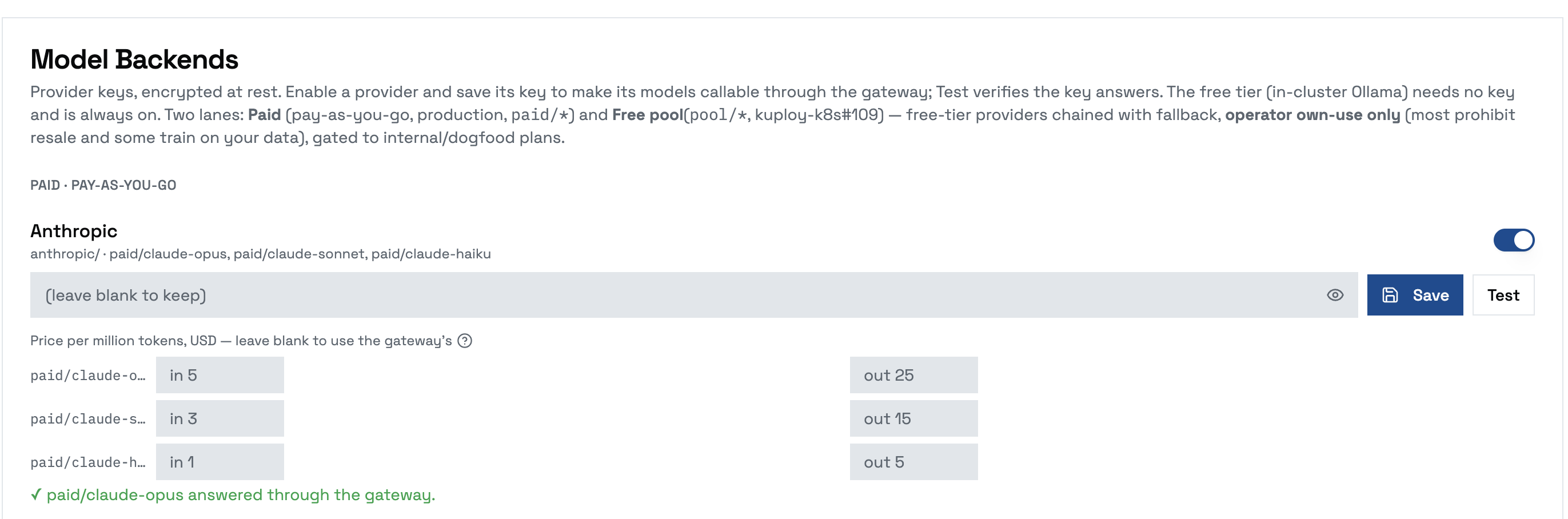
The Admin → AI section lists the supported model-backend providers (Anthropic, OpenAI, Groq — extended in code as needed). Enable a provider, paste its key, and Save: the key is encrypted at rest and its models are pushed into the gateway, making the paid tier callable — no manual gateway edit. Use each provider's Test button to verify the key answers through the gateway before relying on it (mirrors the Registry/Domains connection tests). The default spend cap for a plan that never set one is $20/month (KUPLOY_AI_DEFAULT_SPEND_CAP_CENTS); an explicit 0 on a plan means deliberately uncapped.
Model prices
Kuploy uses model prices for one thing: choosing which model a paid organization starts on, and labelling the cheapest and dearest options in the Org Agent's model picker. They never appear on a tenant's bill — spend is still whatever the gateway meters.
Prices come from two places, checked in this order for each model:
- What you declare under Admin → AI, in the price fields beside each provider's key — USD per million tokens, input and output, the unit provider price pages print.
- What the gateway reports from its own price list, used for anything you leave blank.
Leaving a field blank means "use the gateway's", shown as the field's placeholder. You can override just one side — declare an input price and keep the gateway's output price. A model neither source prices is treated as unknown, never as cheap.
With prices known, a paid organization starts on the cheapest priced paid model (for Anthropic that is Haiku, not Opus). If no paid model has a price at all, the default is the first one enabled — exactly what happened before prices existed. The free built-in model reports no cost because it has none; it is listed as its own option rather than winning the comparison.
The gateway's prices are refreshed every few minutes. A change takes effect the next time an organization enables Platform AI or provisions its agent — existing chats keep the model they started with.
Claude models on Kuploy-supplied credit
Instead of your own Anthropic key, the paid/claude-* models can run on prepaid AI credit you buy on kuploy.app.
Kuploy-supplied AI spends your prepaid credit, so it stays off until you turn it on — and asks you to confirm when you do.
Turn it on
- Buy a credit pack on kuploy.app.
- Open Admin → AI. In Claude models: Kuploy-supplied or your own key, click Use managed (kuploy.app) and confirm.
- Your license syncs straight away, so the change lands in one round-trip.

What the card tells you
| The card reads | Meaning |
|---|---|
| BYO — your own Anthropic key | Claude models use the Anthropic key under Model Backends. |
| Managed — waiting for kuploy.app | Switched on; the license hasn't brought the credit through yet, or kuploy.app declined — the reason is shown under it. |
| Managed — Kuploy-supplied credit | Running on your credit, with the credit and what's been spent shown under it. |
What changes, and what doesn't
- Only who serves the Claude models changes.
paid/claude-opus,paid/claude-sonnetandpaid/claude-haikukeep their names, so organizations' keys, plan tiers and spend caps, app bindings, AI Chat and the Org Agent carry on with nothing to rotate or redeploy. - Other providers are unaffected. A saved Anthropic key stays saved but unused while managed is on.
- When the credit runs out, Claude calls are refused until you buy more. If kuploy.app declines — no credit, or your plan doesn't include AI — the card shows why.
- Use my own keys switches back at once, to the Anthropic key under Model Backends if you have one. Without one, the Claude models stop answering — the confirmation says so.
Deployment and infrastructure internals (the model gateway, the agent runtime, network policies, sizing) are documented in the kuploy-k8s repository: docs/ai-gateway.md and docs/agent-runtime.md.