AI for your own applications
Beyond the console panel, an organization owner or admin can bind AI to a deployed application — like binding a database: bind, and env vars appear in the app.
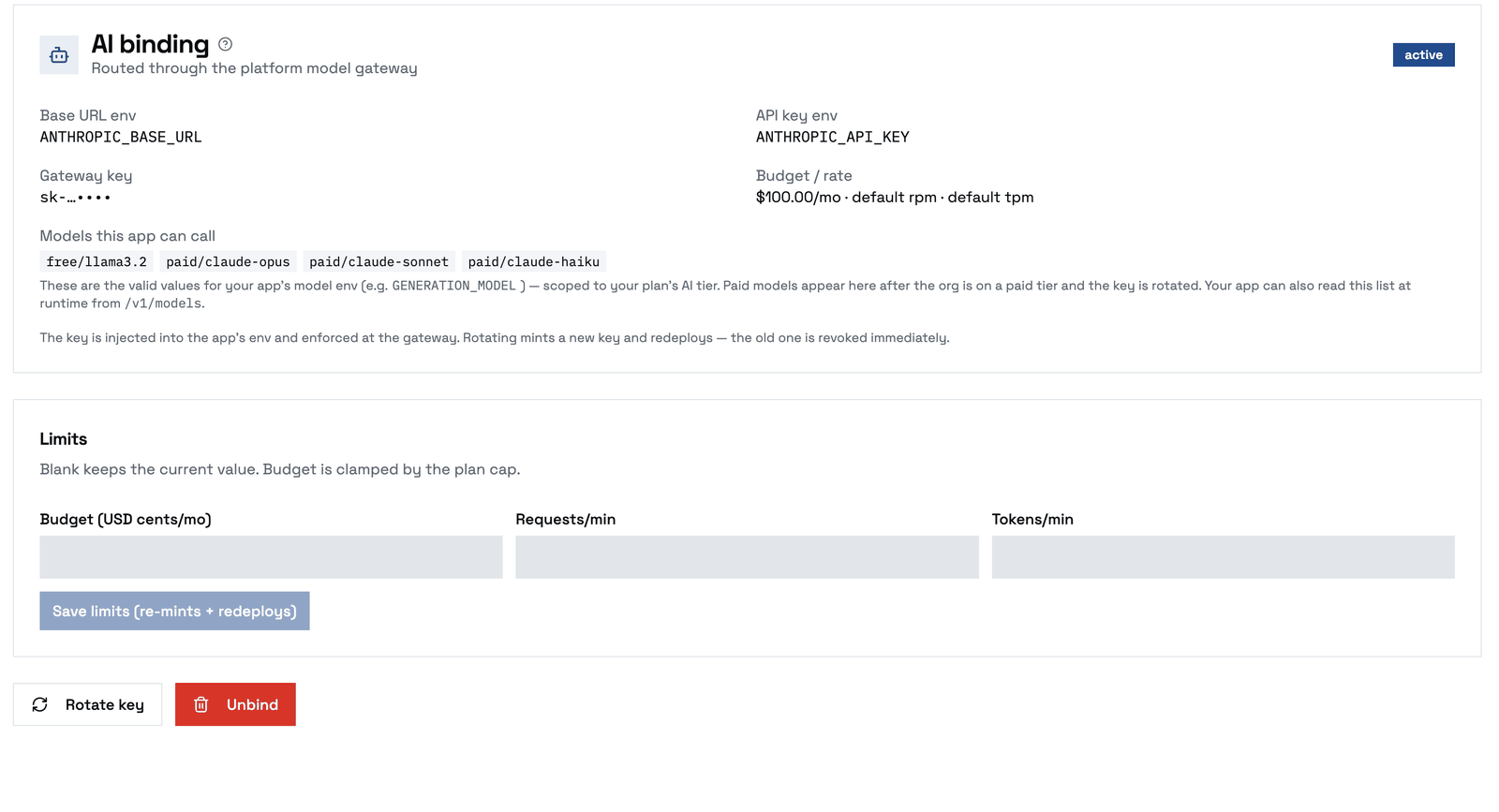
How to bind: open the application's environment in the console, use Create Service → AI Model Access, pick the application and an SDK preset, and confirm. The binding is created for that app (you never enter an application id), the env vars are injected, and the app redeploys. Manage it afterwards from its card under the environment's services — Rotate key, adjust budget/rate limits, or Unbind.
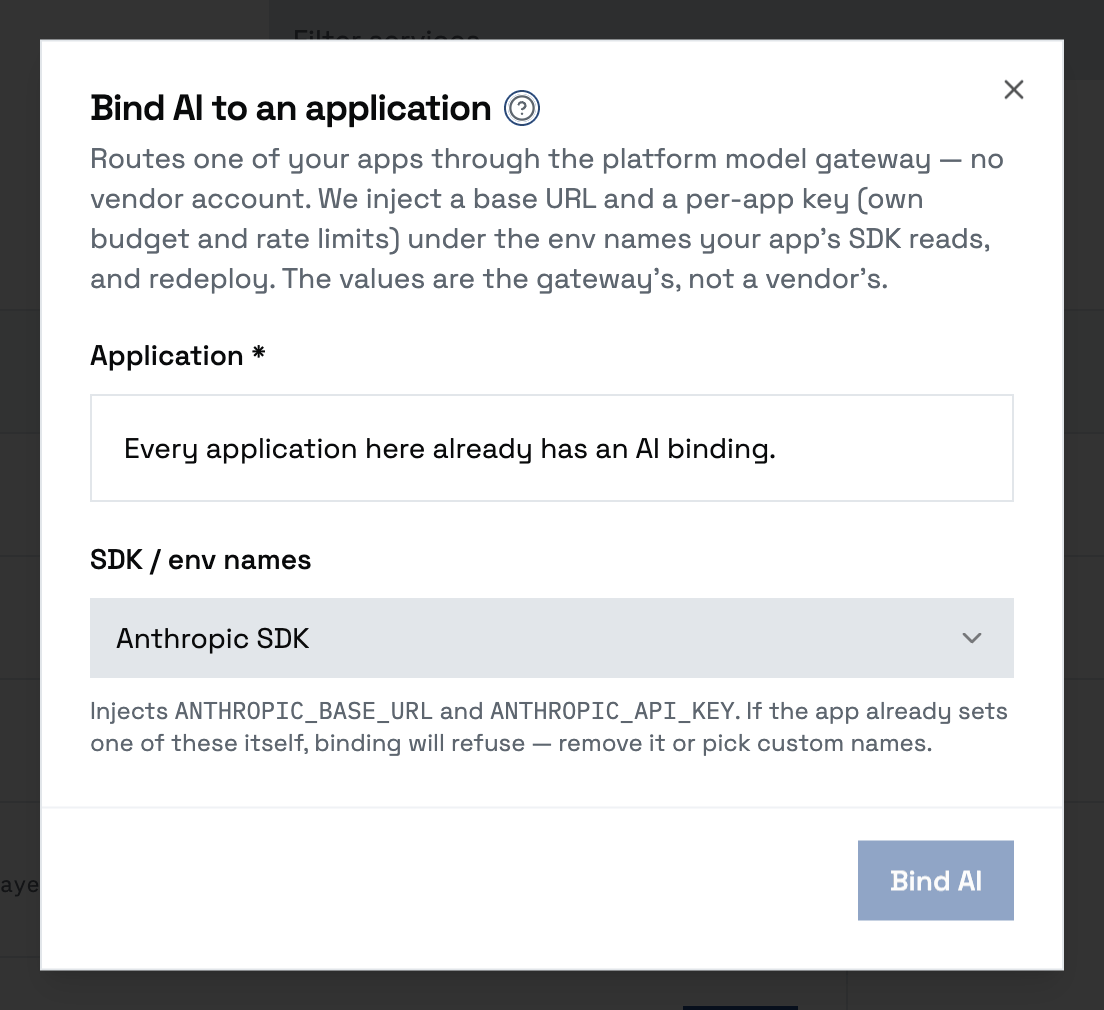
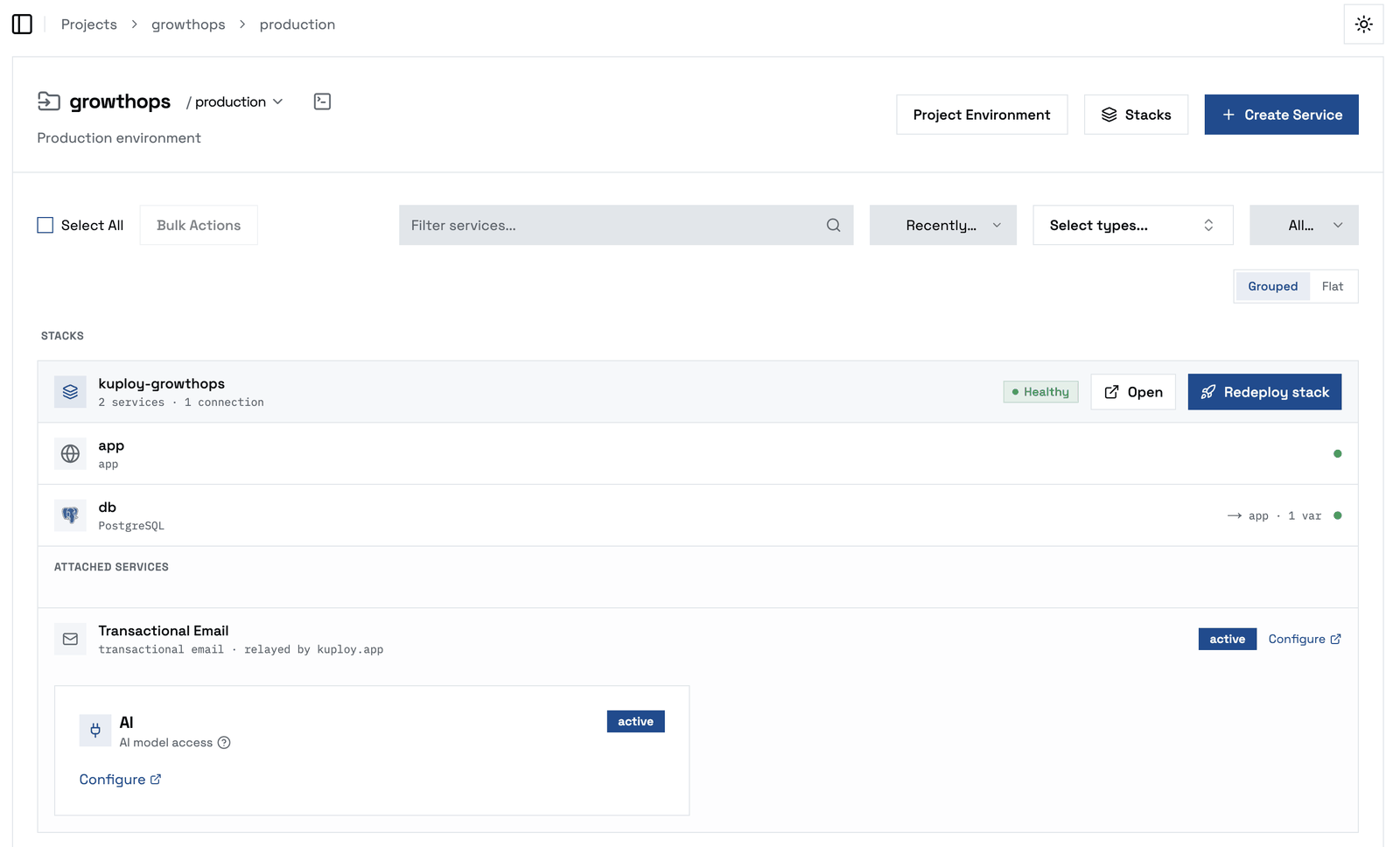
The binding writes two environment variables into the application and redeploys it. You pick a preset to match whatever SDK your app uses — the gateway speaks both major dialects:
| Your app uses | Bind with |
|---|---|
| Anthropic SDK | ANTHROPIC_BASE_URL + ANTHROPIC_API_KEY |
| OpenAI SDK | OPENAI_BASE_URL + OPENAI_API_KEY |
| Something else | Whatever env names your code reads for base URL + key |
Don't let vendor-flavored names mislead you: the values are not a vendor account. The URL points at the platform's model gateway, and the key is a per-application gateway key with its own monthly budget and rate limits. Your app's SDK talks to the platform gateway with zero code changes.
Who provides what, and who pays:
| Layer | Provided by | Paid by |
|---|---|---|
| The two env values | The platform, at bind time | — |
| Free-tier models | The platform's built-in inference | The operator (compute) |
| Premium models | The operator's vendor account behind the gateway | The operator pays the vendor; you pay via your plan |
| Your app's usage | — | Bounded by the app's budget/rate limits and your plan's cap |
If your app already sets its own vendor key in those env names (the do-it-yourself alternative — your key, your vendor bill, the platform uninvolved), binding will refuse rather than overwrite it: remove the manual key first, or bind under different env names. Rotating a binding's key invalidates the old one immediately and redeploys the app — use it if a key leaks, not to pick up a plan change (those apply on their own); unbinding revokes the key and removes the env vars.
Your app never holds a vendor key: it talks to the gateway, and the gateway enforces the binding's budget and your plan's cap.
Choosing which model your app calls
The binding injects only the base URL and the key — it does not set which model your app requests. That's your app's own config, because the platform can't know the env var your code reads for it (one app calls it GENERATION_MODEL, another MODEL, another AI_MODEL) or which model you want. So after binding, set your model-selection env var yourself on the application's Environment tab and redeploy.
Two rules for the value:
- Use a gateway model name, not a raw vendor name. The key is scoped to the platform's model groups, so request e.g.
free/llama3.2orpaid/claude-opus— not a vendor id likeclaude-opus-5(the gateway rejects unknown names). - The names you're allowed depend on your plan's AI tier, and on which providers your plan includes. The free tier always offers
free/*;paid/*models are available only if your plan is on the paid AI tier (and the operator has configured that provider). A plan can also be limited to specific providers — for example Groq-only, or Claude-only — in which case only thosepaid/*names appear for your keys. A request for a name outside your plan is refused even though the model exists — see your plan, or ask your operator. When your plan's tier changes, the models your key (and every app binding) can call update automatically within a few minutes — you don't rotate, re-bind, or redeploy to get them. Re-query/v1/modelsto see the new set.
For a quick smoke test, free/llama3.2 works on any plan with the AI assistant enabled.
Discovering what you can call, in code. You don't have to hardcode the list: your app can query the gateway's standard models endpoint with the injected key and get exactly the models this binding is allowed (it's scoped to your plan's tier). For example GET $ANTHROPIC_BASE_URL/v1/models (or the SDK's models.list()) returns them — pick one for GENERATION_MODEL at runtime, or just to verify your tier.
Which model for which job
Model names map to a size/speed class. Pick the smallest one that does the job — smaller is faster and cheaper, and for narrow tasks it's often just as good. (Exact names depend on what your operator has enabled; query /v1/models for your list.)
| Model | Class | Good at (concretely) | Example |
|---|---|---|---|
free/llama3.2 | Tiny, free, local | Smoke tests, simple/short drafting, basic classification. Free tier runs on CPU — expect slower replies and weaker facts. | "Generate a placeholder product blurb for this SKU." |
paid/claude-haiku | Small, fast, cheap | High-volume extraction, classification, intent-reading, tidy structured output, first-draft copy. The workhorse for app features that run a lot. | "Extract {name, email, plan_interest} from this inbound message." · "Is this review positive, neutral, or negative?" |
paid/claude-sonnet | Mid, balanced | Most app features that need real reasoning and good writing — summaries, support replies, content generation from context. | "Write a support reply from this ticket + these two KB snippets." |
paid/claude-opus | Frontier, slower, priciest | Hard multi-step reasoning, complex agents, high-stakes or ambiguous work where quality matters more than cost. | "Given this 40-page contract, list the termination clauses and their risks." |
paid/gpt | Mid (OpenAI) | General-purpose alternative when you specifically want a GPT model. | "Rewrite this paragraph in a friendlier tone." |
paid/groq-llama-70b | Fast, open-weights | Latency-critical or cost-sensitive tasks that still need a capable model; good for tool-use loops. | "Route this request to the right handler with a one-word label." |
Rule of thumb: haiku for volume, sonnet for most features, opus for the hard 5%. Start at haiku and move up only if quality falls short — not the other way around.
Prompt caching (paid Claude models) — an optimisation, safe to skip on a first read
Prompt caching
If your app sends the same large prefix on many requests — a big system prompt, a long instruction block, tool definitions, or a growing conversation — mark it with Anthropic prompt caching and the platform gateway passes it straight through to the model. A cache read is billed at roughly 10% of normal input, so a stable prefix reused across calls cuts cost sharply.
A stable prefix is the part of your request that's identical on every call — the system prompt, tool definitions, a long standing instruction or reference document. Mark the end of it with a cache breakpoint; put the part that changes (the user's message) after the breakpoint.
- Your
systemmessage is cached for you. On everypaid/claude-*model the gateway automatically marks the request'ssystemmessage as a cache breakpoint. Anthropic caches everything up to a breakpoint, and tool definitions come before the system block, so a stable system prompt and your tool definitions get cache reads with no code change. The same applies to the Org Agent, whose system prompt and tool definitions repeat on every turn of a tool-call loop. - Anything in the conversation itself (a long reference document in a user turn, a growing multi-turn history) is a per-request choice you make in your own code: put
"cache_control": {"type": "ephemeral"}on the last content block you want cached. (In the Anthropic SDK: acache_controlfield on the block; the OpenAI dialect supports the same on message content.) Anthropic allows at most four breakpoints per request; the automatic system one counts as one of them. - One caveat of the automatic breakpoint: a cache write costs ~1.25× normal input, so a long system prompt that is sent once and never reused within five minutes pays a small premium instead of saving. Reuse it at least once and it pays for itself (see the example below).
- It only helps paid Claude models with a large-enough stable prefix — roughly 1K+ tokens for Sonnet/Opus, larger for Haiku (a few-thousand-token prefix is a safe floor). Below the minimum, nothing is cached and you're billed normally.
free/llama3.2ignores it.
How you're billed — each request splits its input into three separately-priced buckets:
| Bucket | What it is | Price vs normal input |
|---|---|---|
| Cache write | the prefix, the first time it's seen | ~1.25× (one-time premium) |
| Cache read | the same prefix, every later call | ~0.10× |
| Normal input | everything after the breakpoint (the user's message) | 1× |
So a big prefix costs a little extra once, then a tenth of its price on every repeat — while your variable input is always billed normally.
Worked example — a 16,800-token system prefix on Sonnet (input at $3 / million tokens):
| Without caching | With caching | |
|---|---|---|
| 1st call | $0.050 | $0.063 (write) |
| Each later call | $0.050 | $0.005 (read) |
| 10 calls total | $0.50 | $0.11 |
≈ 78% cheaper across 10 calls, and it pays for itself by the 2nd. The more you reuse the prefix, the closer the savings get to 90%.
Metering stays accurate: the gateway records cache-read and cache-write tokens at these rates, so your plan's spend reflects the savings automatically — no action needed.